Off the clock · Jul 2026
Taking apart a fake mParivahan e-Challan app
How a fake government e-Challan app steals OTPs, UPI PINs and card numbers, how I took it apart without ever running it.
Where do the stolen OTPs actually go?
In July 2026 I got a WhatsApp message from an unknown +1 number with a picture of a traffic fine, a vehicle number, and a demand to "download the application attached with this message from Traffic Police Department" and pay a challan of one thousand rupees through a short link "to avoid any further legal action". The app was called mParivahan, which is the name of a real government app for vehicle documents and traffic fines (e-Challans), so the name alone does a lot of the convincing.
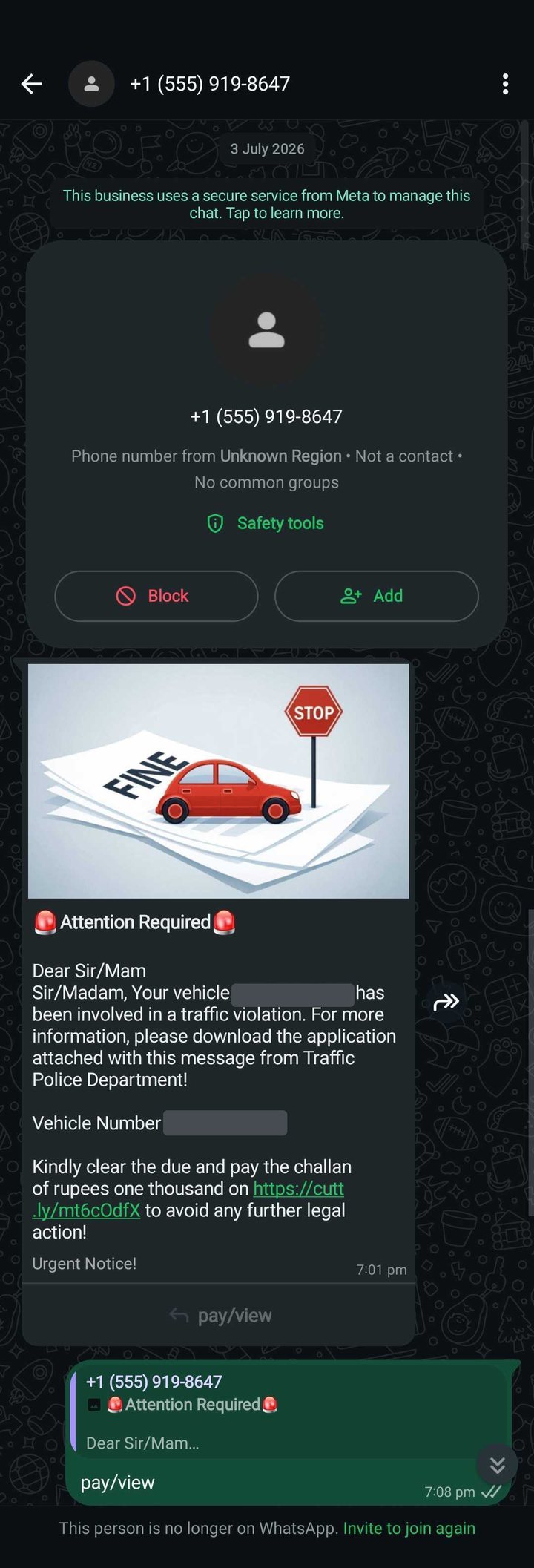
I wanted to know what it would have done and where the stolen data would have ended up, meaning the actual servers and accounts, because those are the things that can be reported and taken down. I also did all of this in a sandbox - I was not sure what all it could do and I didn't want to compromise my laptop :P
How it works
flowchart TD
    A["WhatsApp message with a short link"] --> B["Fake app downloaded from GitHub"]
    B --> C["Phone cut off from the internet, fake 'Update' screen"]
    C --> D["You tap Install: a hidden second app"]
    D --> E["Asks to read SMS and notifications"]
    E --> F["Fake fine payment: UPI PIN and card asked again and again"]
    E --> H["Every SMS uploaded"]
    F --> G[("Attacker's control panel")]
    H --> G
    G --> I["Sends SMS from your SIM"]
    G --> J["Forwards your calls"]
    K[("Firebase: wakes phones, can point them to a new panel")] --> D
Getting onto the phone
The WhatsApp link was a shortlink that redirected to an APK on GitHub, identical to the one that had been installed. The GitHub account behind it had seven copies of the app, with 10k+ downloads between them when I checked, and they came from three different "builders", each hiding the real app in a different way. I only looked closely at mine.
The first app: a wrapper
The first app does very little, and does it carefully. It asks for permission to run a VPN and then routes all traffic into a dead end, so the phone is offline. I can't prove why, but my guess is that it stops Google's Play Protect from checking the new app online during the install.
Next it shows a fake Play Store screen with "Update Available", "Critical security vulnerability patch" and a blue Update button. Tapping it unscrambles the hidden second app, Android asks whether to install it, and having just been told there's a security update, you tap Install. The second app launches and the internet comes back.
The second app: the real thing
The hidden app has no icon and hides from the recent apps list, and this is where everything actually happens.
Permissions. It asks to read and send SMS and make calls, keeps nagging until you let it watch your notifications, and asks to be exempt from battery saving so that Android never stops it.
A fake login. It asks for your mobile and vehicle numbers and shows the real government e-Challan page so that it looks legitimate.
The payment trap. You choose UPI or card, and the app is built so that both fail just enough times: the first UPI PIN always "fails", the second usually fails too and sends you to the card form, and the card form fails until the third attempt. Every PIN and every set of card details is sent to the attacker the moment you submit it. So a determined victim types their UPI PIN twice and their card number, expiry and CVV up to three times before seeing a success page, and if they tried a different account each time, the attacker now has 2 UPI PINs and 3 sets of card details.
Reading your SMS. Your whole SMS history is uploaded, followed by every new message, sent or received. With your UPI PIN, phone number and every OTP, the attacker has what they need.
Sending SMS as you. The panel can tell the app to send a text from your SIM to any number,
with any message. The code doesn't say what the attacker sends, but plausible uses are messages
that register your number with a bank or UPI app, or the same lure sent on to your contacts.
I was not going to let this run to find out :)
Forwarding your calls. The panel can supply a phone number and the app quietly turns on call forwarding to it, so a bank's verification call rings the attacker and not you.
Staying alive. It restarts after a reboot, keeps running in the background, and retries failed uploads when the internet returns.
What it doesn't do. It doesn't take over the screen or draw over other apps. The notification access is only used as a wake-up signal in this version, and it doesn't upload your notifications. There's also code to collect your Google account addresses, contacts and call logs, but nothing that I found uses it.
The attacker's side
All the stolen data goes to one web panel at nexus-panel[.]in, and every request is tagged
with an operator ID and a phone ID.
The second piece is a Firebase project called ghostx-panel, which does two jobs: it wakes
phones up and can hand them SMS jobs directly, and it holds the panel's address, so changing
one setting there moves every infected phone to a new server.
The operator ID and the names read like a panel rented out to several operators, though that's a guess from the naming. I've left out the keys and secrets I found in the app, because they're useful to Google and don't belong in a blog post.
How I took it apart
The work took two days and I used GLM 5.2 for it. This was when I was experimenting with moving away from Anthropic. Since I was not able to justify the monthly sub with the amount of time I could spend using it, I was trying out other models that were more affordable on my pocket. GLM did a fantastic job in decompiling the app binaries and the encryption that eventually let us see what we were working with!
The timeline below shows the attack as I understood it at each point.
1. A file that won't open
Everything ran in a sealed-off container on my laptop with no internet access. The cost of that is that I can't see live victims or what the panel is doing today (not that I wanted to), but for abuse reports, what's in the app is enough.
With that set up, the first problem was that every standard tool failed to open the file. It had been packed with deliberately wrong labels that Android ignores but desktop tools trust, so GLM wrote a small script that ignored the labels and read it piece by piece, which got it open. Inside was a tiny app: a VPN, a fake update screen, and a scrambled file with the key to unscramble it sitting right next to it.
2. The real app and the payment trap
Unscrambling it gave a second app, broken and fixed the same way, and easy to read once open. Its internal name had nothing to do with traffic fines, so I'd guess the code gets reskinned for other lures. The payment trap was the most deliberate part, and it only makes sense if the goal is to collect as many secrets as possible before the victim gives up.
3. Where the data goes
The app's settings gave me the panel address, the Firebase project and the operator ID, and the panel's domain turned out to be already suspended at the registrar before I reported anything.
So I drafted five reports: Google (for Firebase), the hosting company, Cloudflare, CERT-In (India's cyber emergency team) and the national cybercrime portal. Firebase went first, because taking it down hurts every infected phone at once.
4. Back to the link
From another sealed container I followed the shortlink to a GitHub download, fingerprinted it and deleted it. It matched my file exactly, so GitHub became a reporting target too. Then I reported the Firebase project to Google and emailed CERT-In the fingerprints, domains, GitHub account and the write-up.
5. The mirror farm
That led me to look at the whole GitHub account. Seven projects carried the same app, with 10k+ downloads between them, from three different builders. The account was created in late April 2026, and every upload had the same author name, a Proton Mail address and the same timezone as India.
Each project looked like a spare copy, probably there to survive takedowns one at a time, so the GitHub report asked for the whole account. I also kept a local copy of everything as evidence, since it would vanish once GitHub acted. That broke my rule to delete downloads after fingerprinting, but I did it on purpose, wrote it down, and never ran anything in it.
6. The panel's API
My last piece of work was a reference of how the app talks to the panel, written for Google and the police from the code alone: the 16 kinds of request and how each is tagged. The operator ID is what ties each infected phone to one operator on a shared panel.
Conclusion
Once I knew where everything was going, I reported it to the people who could actually pull the plug. I reported the Firebase project to Google, reported the GitHub account with the proof that its download was the same file I'd been sent, and emailed CERT-In the write-up, the indicators and the WhatsApp screenshot, asking them to take down the panel and the Firebase project and to warn banks and UPI apps about this family.
GitHub came through. About three weeks later their Trust & Safety team wrote back that the account broke their terms, and the account, along with every copy of the app on it, is gone. Google sent an automated reply, and then a generic one saying they just hold the platform and cannot do anything about what is hosted on it. I haven't heard back from CERT-In, and I'm choosing to believe it's sitting in a very long queue.
The repo has the code I read, my notes and the full list of indicators, but not the app itself.